CONES
CONES (Coupling OpenFOAM with Numerical EnvironmentS) is an application aiming to couple the CFD software OpenFOAM with open-source code.
Installation
Download CONES with:
git clone https://gitlab.ensam.eu/pe431/cones-dev
Get the latest OpenFOAM-dev version:
git clone https://github.com/OpenFOAM/OpenFOAM-13.git
Apply the CONES patch (this adds the conesFoam solver to OpenFOAM):
./conesPatch path/to/OpenFOAM-13
Install the Python dependencies of conesToolBox (a virtual environment is recommended):
python3 -m venv pyCones
source pyCones/bin/activate
pip install -r src/conesToolBox/requirements.txt
Every new terminal session needs both OpenFOAM and the Python environment sourced before running CONES:
source path/to/OpenFOAM-13/etc/bashrc
source path/to/pyCones/bin/activate
Usage
Two main elements constitutes CONES:
Ensemble of \(m\) simulations in OpenFOAM.
Code with the Data Assimilation (DA) algorithm.
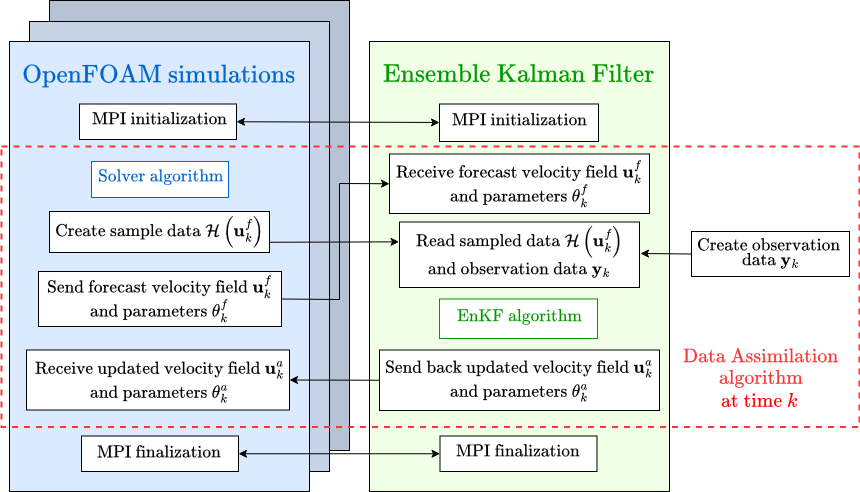
Schematic representation of CONES for online sequential data assimilation
Setting up your own case follows the same pattern the tutorial below walks through end to end:
Set up a reference simulation in a folder named “case_orig”.
Generate the mesh and decompose it.
Set up a topoSetDict that encompasses the regions of your domain where DA has to be performed.
Run the topoSet OpenFOAM utility.
Use foamCloneCase to clone the reference simulation settings to generate the ensemble members
Modify the ensemble members according to the initial distribution wanted
Name each ensemble member folder as “en” followed by the id number of the ensemble member
Launch CONES with
mpirun, as described in Running CONES.
Tutorial: your first CONES run (lid-driven cavity)
This tutorial runs the smallest complete example shipped with CONES,
tests/cavityCones: a 2D lid-driven cavity where CONES estimates the
moving wall’s velocity from 5 synthetic velocity observations. It assumes
the installation steps above are already done and sourced in your terminal.
Move into the test case:
cd tests/cavityCones
The case contains:
case_orig/: the reference (undecomposed) OpenFOAM case. Itssystem/conesDict(see the full reference) configures the DA problem — here, a classic EnKF estimating themovingWallboundary velocity (parameterVar "u",numberParameters 1) fromu,v,wvelocity observations stored inconesObservations/observation_database.nc(generated with thegenConesObs.pyscript next to it — see The observation database for what such a file must contain).Allrun: builds the ensemble and launches CONES.
Launch the run with 2 ensemble members, 2 processors each:
./Allrun 2 2
This script:
Runs
topoSetoncase_origto mark the DA region (see itssystem/topoSetDict), then decomposes it into 2 subdomains.For each ensemble member, draws a moving-wall velocity from
tests/cavity_priors/prior_mu1_s5.txt, writes it into0/U, re-decomposes and clones the result into its ownen0/,en1/, … folder withfoamCloneCase.Launches everything with a single
mpiruncommand: oneconesFoam -parallelgroup per ensemble member, plus main_EnKF running the DA cycle on the last 2 ranks — exactly the pattern described in Running CONES.
With
endTime 0.06anddeltaT 0.005insystem/controlDictandobservationWindow 10inconesDict, this case performs a single, fast assimilation cycle — a few seconds on a laptop.Check the result: the estimated parameter’s ensemble mean and standard deviation at each DA cycle are appended to
par.log(columns: cycle, time, mean, std), and per-phase timings/peak memory toperformance_report_journal.csv:column -t par.log
utils/live_graph.pycan plotpar.loglive while a run is going, but it compares against a ground-truth value and a LaTeX rendering setup that are hardcoded for a different case — see the script before reusing it here.
From here, adapting the tutorial to your own case means: put your reference
simulation in case_orig, add a system/conesDict (see the cavity one
as a template, and the The conesDict reference for what each option means), and
reuse the same three-step Allrun pattern.